


Introducing the Wader Pilot Logbook WebApp

Updated: Sep 20
Your Wader Pilot Logbook, perfectly in sync, on every screen
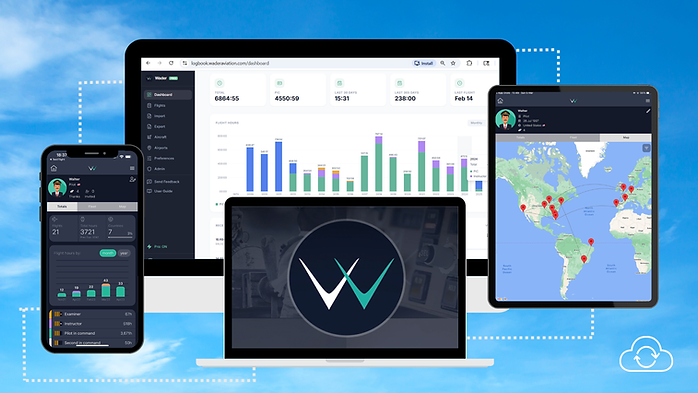
Today, we're proud to close the final gap: the Wader WebApp. Your Wader Logbook is now available in every screen you own, including a full-featured desktop environment, purpose-built for the moments when a small screen just isn't enough.
Your flight data is the most important career asset you own. It should be as accessible, organized, and reliable as everything else in your professional life — keep it safely stored on the cloud and easily trackable anytime, anywhere.
The Wader Mobile App is designed to be the fastest and most reliable tool to log your flights. Easily accessible in the flight deck, at the airport, or on the crew bus — always in your pocket.
But sometimes, at home, managing your flight logs, reviewing your career statistics, checking your recency, or preparing for a job interview, you may want a bigger screen to see the full picture. That's why the WebApp was built for.
If you are getting your logbook ready for an airline screening or reviewing your flight experience before your next rating check ride, that’s the best platform for making sure your logbook is as accurate as you need it to be.
Open any browser, sign in, and your complete logbook is instantly there. Every flight you've ever logged on the Mobile App, synced in real time.
Let's take a look inside the WebApp
Dashboard
The Dashboard is your home screen. Your most important career numbers are right there from the moment you sign in — no need to navigate through different pages, run filters, or generate reports. Click on each total card to quickly personalize your Dashboard with the statistics that matter most to you.

Visually track the timeline of your flight experience in the chart, and monitor your progress toward flight hour milestones. Check your recent flights and totals by aircraft type — all on a single screen.
Flights
See your entire flying history on a single screen. You can also create new flight entries or edit existing logs directly from this page.

Am I logging correctly? Do I have enough hours in the right categories?
In the Flights section you can use a powerful set of search tools to quickly filter, sort, and cross-check any totals you need:
Full-text search across airports, flight numbers, pilot names, and tail numbers simultaneously
Flight instructors can search by student name across thousands of entries in seconds
Seven filter dimensions — date, aircraft, airline, total time, function, rules, and conditions — combinable any way you need.
Running totals updating instantly as you filter: total flights, time, PIC, night, IFR, jet time, takeoffs, and landings
Error-free calculator: get the filters work for you. You can calculate any total without the need to open a spreadsheet or a calculator, reducing the risk of math errors.
IFR, night, and actual instrument mini-bars shown inline on every row, so you can read the character of a flight at a glance.

Aircraft
Your fleet experience, broken down in full detail. The Aircraft page brings your type experience into a clear, organized view.

Whether you're applying for a new position, monitoring flight time toward a consolidation or regulatory minimum, or simply tracking your milestones, this is where managing your fleet experience becomes effortless.
All your aircraft types in one view — sorted by last flown, with total time, last 12 months, PIC, SIC, night, and IFR shown per type.
Filter by category — Jet, Turboprop, Piston, or Other — to focus on what matters for your next application.
Cards or Table view — switch between a rich card layout and a compact table depending on what you need.
Drill into individual tail numbers behind each type with a single click.
Group different aircraft variants under a single type rating.
Airports
Real-time weather at every airport in your logbook — no separate weather app needed.

The Airports page also compiles community briefings with crowd-sourced safety and threat forward operational information, including a map of your complete route history to/from each location.

Import, Export & Preferences
The WebApp also lets you easily manage your Preferences, import Previous Experience, and export your Logbook in personalized formats that meet the requirements of international aviation regulations.

Disclaimer: Some features may require a Wader PRO subscription. You can enroll directly within the WebApp. Learn more here.
The WebApp Beta is live and available for you today!
Why Beta? Because Beta means we build it together. The WebApp is already fully functional — your data is safe, syncs in real time, and every feature you see works as intended. We've tested it extensively, including with active airline pilots on our own team.
The Beta phase is part of the process of making it exceptional. Some edges may still be rough. A feature you expect might still be in development, and something may behave differently across browsers. When that happens, we want to know.
Your feedback directly decides what we build next. It only takes a few minutes — no long forms, no aviation knowledge quiz. Just honest thoughts through a straightforward Beta Survey, available directly in the WebApp.
Open any browser, go to logbook.waderaviation.com, and log in with your existing Wader account. That's it! Nothing else to set up. Not on Wader yet? Create your account today directly in the WebApp.
Your Wader WebApp is waiting for you. We hope you enjoy it!
Safe flights,
Wader Team


Comments